
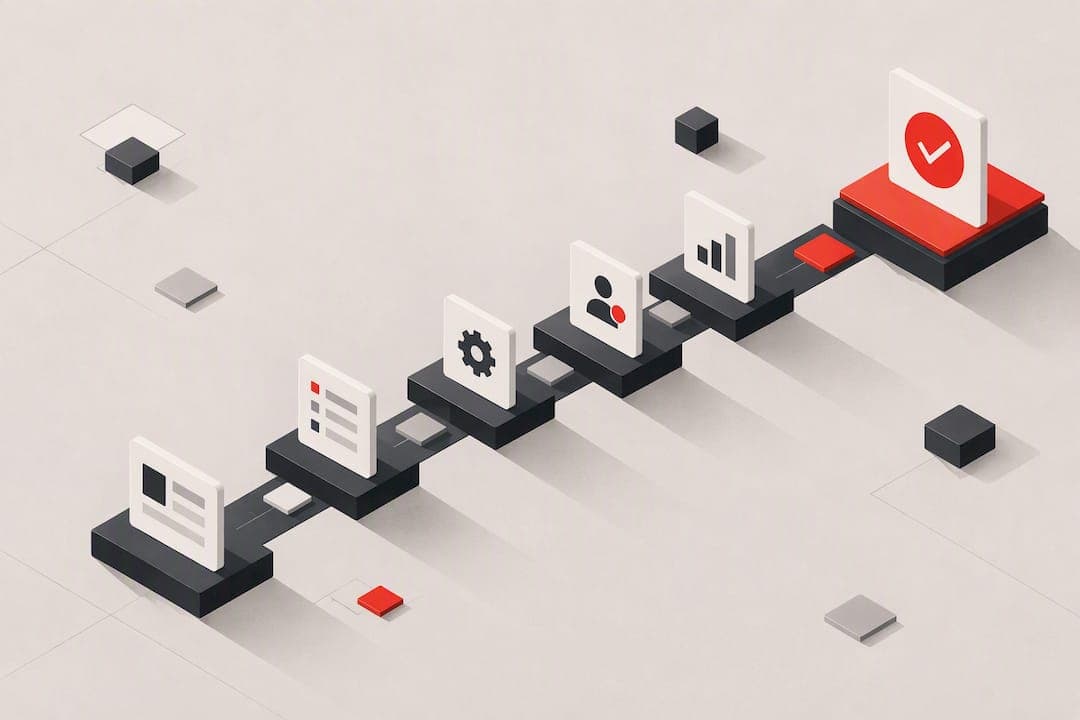
Self-serve onboarding gets new users to their first meaningful result without a sales call, a demo, or a human touching their account. It works best when the path to value is short and the product isn't drowning in configuration steps. When integration work, compliance checks, or custom setup stand between signup and value, pure self-serve breaks down, and a hybrid model with light human intervention performs better.
TL;DR:
- Self-serve onboarding works best with a short, clean path to value and fails when significant configuration, integration, or compliance steps are required before users see benefits.
- Building effective self-serve flows involves mapping the entire user journey, defining a specific activation event, and creating micro-conversions with tailored paths for different user roles.
- Using behavior-triggered messages, in-product guidance with seeded sample data, and automated tools to diagnose friction points significantly improves activation rates and reduces drop-off.
- Fixing common issues like empty shells, overwhelming choices, and mobile or accessibility oversights often yields quick improvements in onboarding success.
- Achieving scalable self-serve onboarding typically requires specialized tooling, clear owner accountability, early instrumentation, and iteration over multiple cycles to reach optimal performance.
Table of Contents
- What Is Self-Serve Onboarding and Why It Matters for Product-Led Teams
- Key Elements of Effective Self-Serve Onboarding
- How Do You Design a Self-Serve Onboarding Flow?
- Implementing Self-Serve Onboarding at Scale
- What KPIs Should You Track to Reduce Onboarding Drop-Off?
- Common Pitfalls in Self-Serve Onboarding and How to Fix Them
- How Save Your App Diagnoses Onboarding Friction
- A Practical Perspective on Rolling Out Self-Serve Onboarding
- Save Your App: A Faster Way to Find Your Onboarding's Weak Points
- Sources
- FAQ
What Is Self-Serve Onboarding and Why It Matters for Product-Led Teams
Self-serve onboarding is the process where new users activate a product on their own, guided entirely by in-app design rather than a person walking them through it. No sales rep, no onboarding call, no PDF checklist emailed after a demo. The user signs up, and the product itself teaches them what to do next.
This is the backbone of product-led growth. Instead of a sales team convincing someone a product is worth buying, the product convinces them by getting them to a genuine "aha" moment fast enough that they see the value themselves. That aha moment, sometimes called the activation event, is the single action or outcome that predicts whether someone sticks around. For a project management tool, it might be creating a first task and inviting a teammate. For a design tool, it might be exporting a finished asset. Self-serve onboarding exists to get people to that moment as quickly and reliably as possible.
The benefits compound as a company grows:
- Scale without linear headcount. A single onboarding flow can activate 10 users or 10,000 without hiring more onboarding specialists.
- Lower cost per activated user. No sales or customer success time spent on accounts too small to justify a human touch.
- Faster time-to-value. Users don't wait for a scheduled call; they get value the moment they're ready for it.
- Support deflection. A well-designed knowledge base and in-app guidance answers questions before they become tickets.
Self-serve isn't the right call everywhere, though. Products that require data migration, custom integrations, or security reviews before a user sees any value tend to punish self-serve attempts. Enterprise software with multiple stakeholders, procurement steps, or regulatory onboarding (think healthcare or financial services with KYC requirements) usually needs a person in the loop, at least for the first account setup. Self-serve onboarding scales well when the path to first value is short and the interface is clean, but struggles the moment configuration or integration work has to happen before value appears.
Key Elements of Effective Self-Serve Onboarding
A self-serve flow that actually works is built from a specific set of parts, not a single clever tour. Skip one of these and the whole system tends to leak users at a predictable point.
- In-product guidance. Tooltips, checklists, and interactive walkthroughs point users toward their next action. The mistake most teams make is stopping here, shipping a slick tour that shows features but never gets the user to do anything real. Product teams call this the "empty shell" problem: the interface looks finished, but there's no data, no sample project, nothing for the user to act on. The fix is seeding accounts with a template, a demo dataset, or a pre-built example the user can immediately edit instead of building from a blank page.
- Behavior-triggered sequences. Generic drip emails sent on a fixed schedule ignore what the user actually did. A sequence that reacts to behavior, sending a specific nudge only when someone stalls at a particular step, performs far better. Behavior-triggered onboarding sequences that respond to real user actions can measurably lift conversion and trial-to-paid rates compared to generic messaging, because the message closes the exact gap blocking that user's progress.
- Searchable knowledge base and just-in-time help. Users hit walls at moments a tour can't predict. A searchable help center, plus contextual tooltips that surface the right article at the right screen, catches these edge cases without requiring a support ticket.
- Friction-reducing entry flows. Every additional field, password requirement, or confirmation step costs completions. Magic links, QR-code entry for mobile handoff, and mobile-first form design shrink the gap between "I clicked signup" and "I'm inside the product."
- Orchestration rules for conditional paths. Not every user needs the same onboarding. A marketer and a developer signing up for the same tool have different first tasks. Orchestration logic routes each persona or intent to a tailored sequence instead of forcing everyone through one generic tour.
How Do You Design a Self-Serve Onboarding Flow?
Building self-serve onboarding is a sequence of decisions, not a single design sprint. Here's the order that actually works.
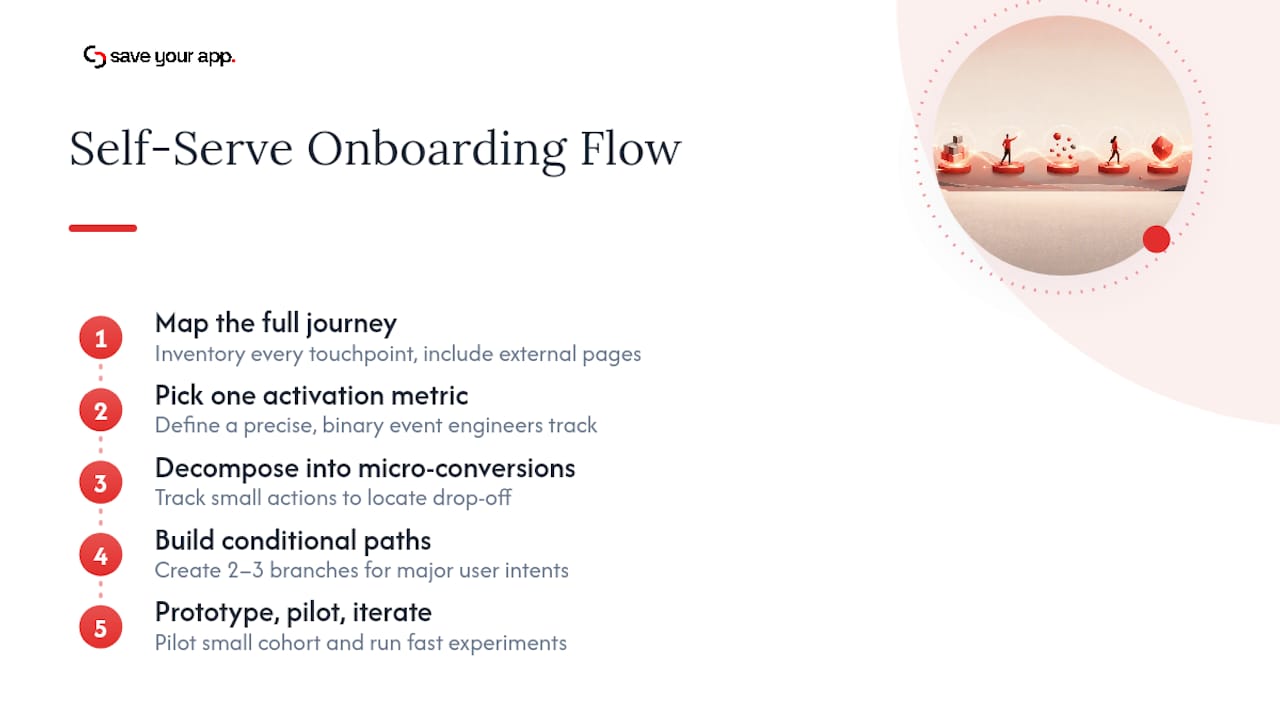
1. Map the full journey and inventory every touchpoint.
Before touching a single tooltip, write down every step a user takes from the moment they land on a signup page to the moment they'd call themselves an active user. Include the ones outside the product too: the marketing page that sets expectations, the confirmation email, the first login screen. Most onboarding failures trace back to a mismatch between what the marketing page promised and what the product actually delivers in the first five minutes.
2. Pick a single activation metric and define its exact event.
This is the step teams skip and regret. A single activation metric, sometimes called the aha metric, focuses the entire team on one measurable outcome instead of trying to teach every feature at once. Vague definitions like "user is engaged" don't work; you need something binary and event-based, like "user created and shared their first document" or "user connected at least one data source." Define it precisely enough that an engineer could write the tracking event without asking a follow-up question.
3. Decompose the journey into the smallest valuable steps.
Break the path to activation into micro-conversions, small, individually trackable actions that each move the user closer to the aha moment. Instead of one giant "complete onboarding" event, track "created account," "invited teammate," "uploaded first file," "viewed first report." This granularity is what lets you find exactly where users abandon the flow later, instead of just knowing that they did.
4. Build conditional paths for major user intents and roles.
Once the core path is mapped, branch it. A free trial user exploring on their own has different needs than someone invited by a teammate who already has context. Build at least two or three paths: one for the self-directed evaluator, one for the invited teammate, one for anyone arriving with a specific job to do (an integration to connect, a report to build). Trying to serve all three with one linear tour usually serves none of them well.
5. Prototype, pilot with a small cohort, then iterate with fast experiments.
Ship the first version to a limited group, not everyone. Watch session recordings, read support tickets, and track the step-level drop-off before rolling it out broadly. Small, fast experiments, testing one changed step at a time, tell you more than a full redesign launched all at once.
Pro Tip: Build your activation event tracking before you build the onboarding flow itself, not after. Teams that instrument first can measure every experiment from day one instead of losing the first few weeks of data.
This process rarely finishes in a single sprint. Most teams treat the first version as a hypothesis, not a launch. The goal of the pilot phase isn't a perfect flow. It's a flow good enough to generate real usage data, which is worth more than another round of internal debate about which tooltip goes where.
Implementing Self-Serve Onboarding at Scale
Getting a self-serve flow to work for one persona is one problem. Getting it to hold up across dozens of use cases, integrations, and device types is a different one, and it's mostly a tooling and operations problem.
Tooling categories to expect:
- In-app guidance tools handle tooltips, checklists, and product tours layered on top of your existing interface.
- Orchestration engines manage the logic: which sequence a user enters, what triggers a nudge, how conditional branches get evaluated.
- Knowledge base platforms power the searchable help center and just-in-time article surfacing.
- Analytics and event tracking tools capture the funnel data you'll need for every measurement decision later.
No single tool does all four well, so most mature self-serve programs run two or three of these in parallel, connected through a shared event pipeline.
Integrations that matter most:
The flow needs to talk to your authentication system (so it knows who just signed up and through what channel), your CRM (so sales and success teams see self-serve activity without asking), your billing system (so a trial-to-paid conversion triggers the right downstream action), and a webhook or events pipeline that lets the orchestration layer react to product usage in near real time. Skipping the CRM connection is a common mistake: self-serve users still eventually need a human touch for upsell or renewal conversations, and a blind spot there costs revenue later.
A template and pattern library approach keeps things consistent as the number of personas and paths grows. Rather than building each new onboarding sequence from scratch, maintain a library of reusable components, a standard checklist pattern, a standard triggered-email template, a standard empty state design, and adapt them per persona instead of reinventing the wheel each time.
Mobile deserves specific attention. A meaningful share of self-serve signups now happen on a phone, often from a link shared in Slack or email rather than a direct visit to a marketing page. Link-based entry flows, magic links that log a user in without a password, matter more here than almost anywhere else, because typing a password on a phone keyboard is where a lot of mobile signups die.
Even a fully automated flow benefits from a light layer of human oversight. Someone should monitor drop-off alerts, review flagged accounts that stall at a critical step, and set clear escalation rules for when a self-serve user needs a human to step in. Good customer service depends on setting clear expectations and designing processes that prevent the same avoidable friction from recurring, and that discipline applies just as much to an automated flow as it does to a support queue.
What KPIs Should You Track to Reduce Onboarding Drop-Off?
Four numbers matter more than the rest: activation rate, completion rate, time-to-first-value, and step-level drop-off. Everything else is a supporting detail.
- Activation rate measures the percentage of new signups who reach your defined aha event within a set window, typically the first session, first day, or first week depending on the product.
- Completion rate tracks how many users finish the full onboarding sequence versus abandoning partway.
- Time-to-first-value measures how long, in minutes or hours, it takes a typical user to reach that first meaningful outcome.
- Step-level drop-off shows exactly which screen or action loses the most users, which is where you focus fixes first instead of guessing.
Getting these numbers right depends on defining the activation event precisely before you start measuring, and instrumenting every micro-conversion along the way, not just the final outcome. Authoritative product growth guidance consistently recommends locking in a single activation metric before running any onboarding experiment, because without it, teams end up optimizing for engagement signals that don't actually predict retention.
Once instrumented, build funnels that show the full path from signup to activation, then segment by cohort. Comparing a cohort that signed up through a demo request against one that came from a pure self-serve landing page usually reveals very different completion shapes, and treating them as one blended number hides the real problem.
Where the data usually points: step-level drop-off analysis tends to surface one or two screens responsible for most of the loss, not an even spread across the whole flow. Fix those first.
Short experiments beat full redesigns. A micro-A/B test on a single screen (changing one field, one button label, one default value) gives a cleaner read than relaunching the whole flow. Staged rollouts, shipping a change to 10% of new signups before going wide, catch problems before they hit everyone. And behavior-triggered messages, sent only when a user stalls at a specific step, consistently outperform time-based drip emails because they respond to what's actually happening, not a fixed calendar.
If the metrics show users stalling repeatedly at the same complex step, especially one involving data import, integration setup, or approval from a second stakeholder, that's usually the signal to add a hybrid touch: a scheduled call, a concierge setup option, or a proactive outreach trigger rather than another automated nudge.
Common Pitfalls in Self-Serve Onboarding and How to Fix Them
Most self-serve failures trace back to a small set of repeat offenders.
- The empty shell. A blank dashboard with nothing to click on kills momentum immediately. Fix it by seeding new accounts with sample data, a starter template, or a pre-built project the user can edit rather than create from nothing.
- Too many choices. Presenting five setup paths on the first screen forces a decision before the user has any context to make one. Fix it by picking the single fastest path to value as the default and hiding alternatives behind an "advanced setup" option.
- Generic messaging. A welcome email that says the same thing to every user, regardless of what they've done, reads as noise. Fix it by triggering messages based on actual behavior: what they clicked, what they skipped, where they stalled.
- Mobile and accessibility oversights. A signup form built and tested only on desktop often breaks on a phone screen, and screen-reader support gets skipped entirely. Fix it by testing every step on mobile first, not as an afterthought.
- Overloaded first sessions. Trying to teach every feature in one tour overwhelms new users before they've done anything real. Fix it with progressive disclosure: reveal advanced functionality only after the user has completed the core action.
Pro Tip: Write onboarding microcopy that names the next smallest action, not the eventual goal. "Add your first contact" converts better than "Set up your CRM," because it's a task a user can finish in ten seconds.
How Save Your App Diagnoses Onboarding Friction
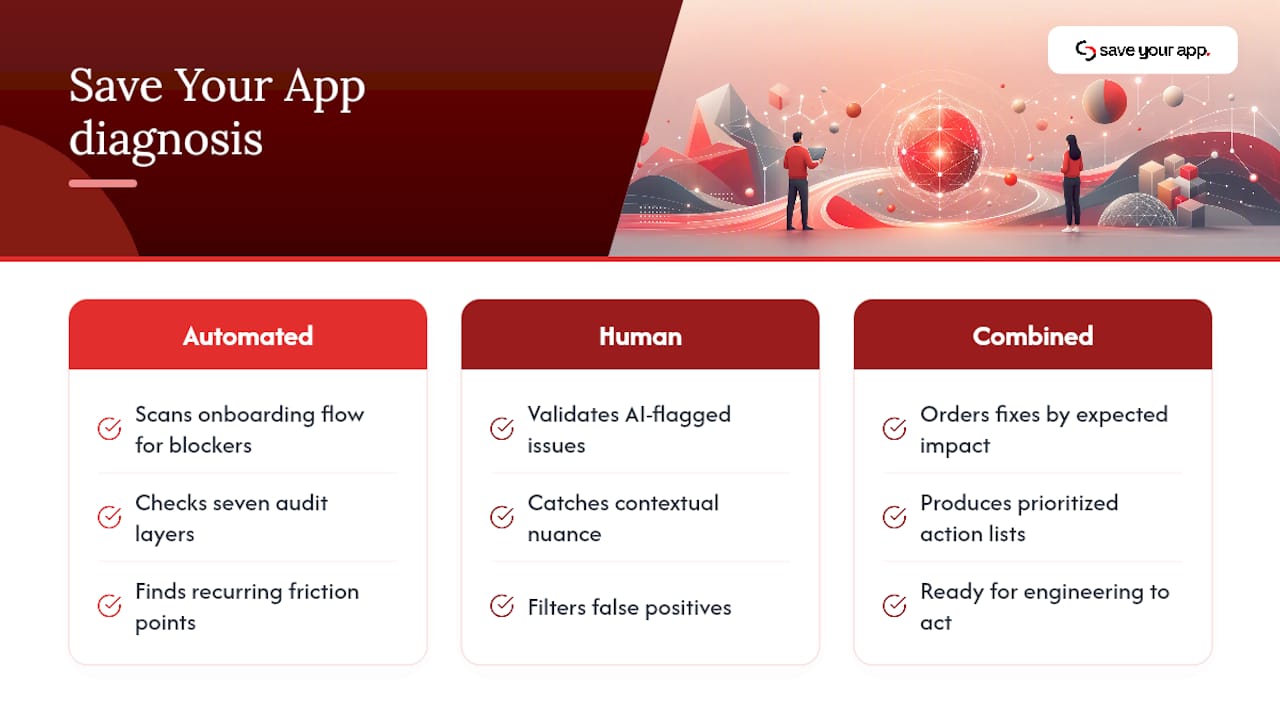
A conversion auditing tool scans a product's onboarding flow for the specific blockers that cause drop-off: unclear pricing shown at the wrong moment, confusing navigation between signup and first value, and friction points that don't show up in a casual walkthrough but show up constantly in real user behavior. The tool checks against seven audit layers, including UX and navigation, conversion, and onboarding specifically, rather than treating onboarding as an afterthought bolted onto a general site audit.
What separates the output from a generic scan is the ranking. Rather than handing a team fifty issues with no sense of priority, Save Your App orders fixes by expected impact, so an engineering team knows whether to fix the confusing signup form or the vague pricing page first. Combining automated diagnostics with human review produces prioritized, credible action lists that teams can act on immediately, because a human beta tester validates what the AI flags, catching context an algorithm misses and filtering out false positives.
For a team wondering where their self-serve flow is actually losing people, a scan built specifically to surface onboarding friction is a faster starting point than another round of internal debate.
A Practical Perspective on Rolling Out Self-Serve Onboarding
Most teams underestimate how long a self-serve flow takes to mature. The first version rarely gets it right, and that's fine, but it means the real timeline to a working flow is closer to two or three iteration cycles than one launch. Watch step-level drop-off from week one, not just the final activation number.
The organizational shift matters more than the tooling choice. Self-serve onboarding only works when someone actually owns the metric, when event tracking exists before the flow ships, and when product, support, and growth agree on what "activated" means. Without that ownership, a good flow decays quietly. And if the same step keeps stalling users after two or three genuine fix attempts, that's the signal to stop iterating blindly and add a human touchpoint instead. Persistence past that point usually wastes more time than it saves.
— William
Save Your App: A Faster Way to Find Your Onboarding's Weak Points
This tool is an alternative to guessing which onboarding screen is losing users: instead of a redesign sprint based on internal opinions, a scan returns ranked, actionable fixes ordered by impact, backed by a human beta tester review that checks the AI's findings against real usage. For a team trying to find its top three or four highest-impact onboarding fixes without a lengthy audit process, that ranked list is the shortcut.
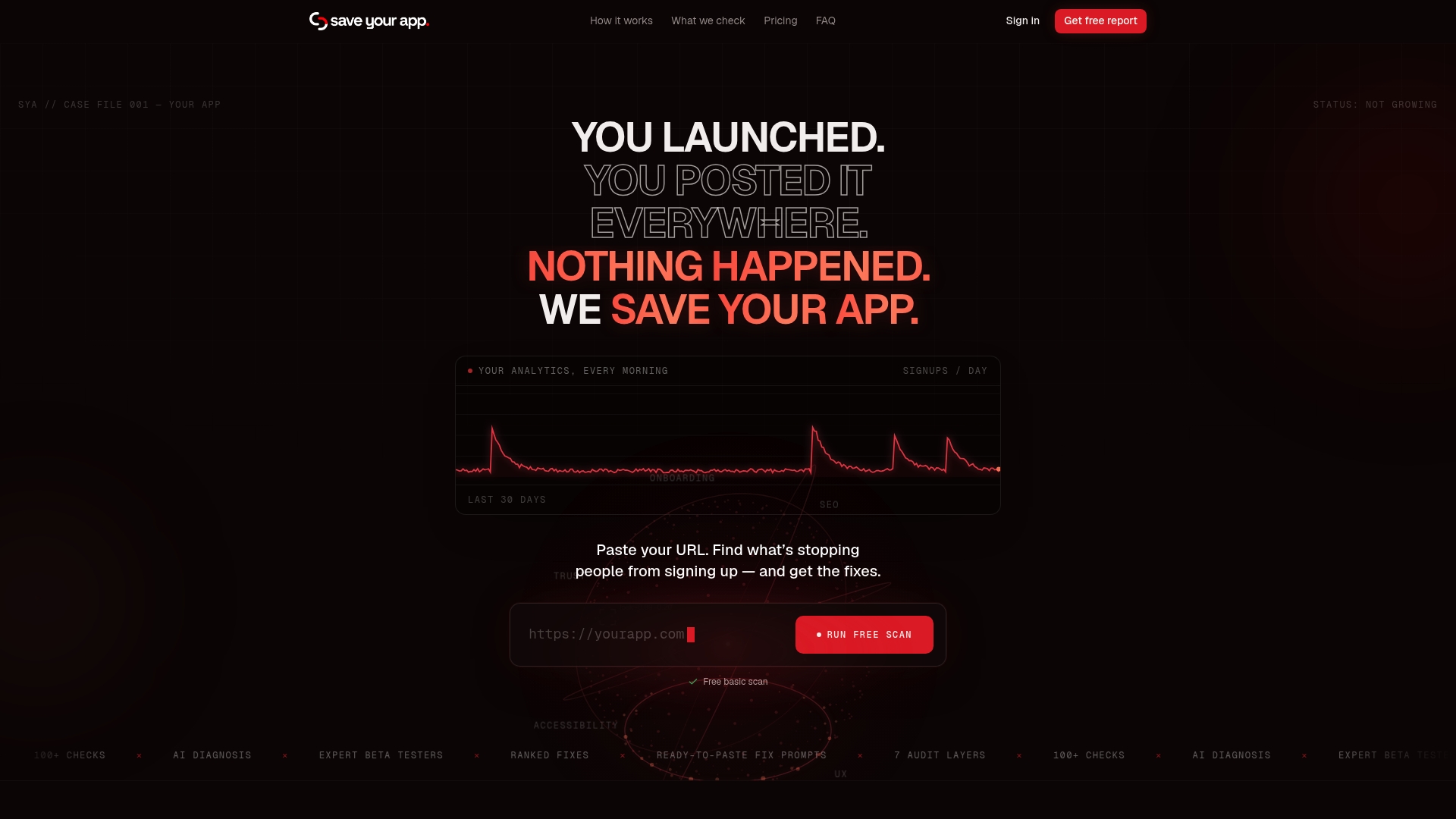
The Free plan gets a first scan running with no cost. Teams that want ongoing tracking and repeated human-reviewed audits can move to Solo at $49 per month or Founder at $129 per month, and anyone needing a fast, focused check can add an Extra 3-day test for $199 one-off. Run a free scan today and see which onboarding fix would move the needle first.
Sources
For deeper context on the ideas covered here, Harvard Business Review's analysis of why employees resist new tech explains the adoption psychology behind friction. HBR's piece on customer service covers designing processes that prevent repeat friction, and Builts.ai's guide to onboarding automation breaks down behavior-triggered sequences in practice.
FAQ
What Are the Key Elements of Effective Onboarding?
Strong onboarding generally combines clear expectations, contextual guidance, fast time-to-value, consistent communication, and a defined activation goal. Definitions of any specific "C" framework vary by source, but the elements covered in this article (in-product guidance, behavior-triggered messaging, a searchable knowledge base, and low-friction entry) map to what practitioners consistently cite as effective.
Can You Give an Example of Self-Service Onboarding?
A new user signs up for a project management tool, lands on a dashboard pre-seeded with a sample project, and a checklist walks them through creating their first real task, no sales call or demo required. If they stall at inviting a teammate, a behavior-triggered email nudges them specifically on that step rather than sending a generic welcome message.
What Are the Stages of a Self-Serve Onboarding Process?
A typical flow moves through signup and account creation, first-session guidance toward the activation event, ongoing behavior-triggered nudges for anyone who stalls, deeper feature adoption once the core value is proven, and finally trial-to-paid or plan-upgrade conversion. Each stage should have its own defined metric rather than one blended completion number.
Is Self-Serve Onboarding Cheaper Than Human-Led Onboarding?
Yes, self-serve onboarding lowers cost per activated user because it removes the need for a sales or customer success rep on every new account. It scales without added headcount, though products requiring complex setup or integration still need some human touch to activate reliably, per findings on when self-serve struggles.