
A working SaaS onboarding checklist is a staged, measurable sequence: pre-onboarding, signup, first value, activation, and expansion, each with an owner and a completion signal. Two metrics decide whether it's working: Time-to-Value and Activation Rate. Before anything else, assign an onboarding owner and instrument your activation event, because a checklist nobody owns and nothing measures is just a wish list.
TL;DR:
- Automating provisioning and auto-invite steps reduces manual errors and ensures accounts are ready before the customer’s first login, speeding up activation.
- Keeping onboarding checklists focused on end-to-end workflows, with measurable signals, significantly improves activation rates and early user engagement.
- Sending personalized, timely nudges within 48 hours and after five days of inactivity increases the likelihood of recovering stalled accounts before churn occurs.
- Tracking key metrics like time-to-Value and activation rate support continuous improvement, with thresholds under 70% indicating areas needing attention.
- Combining in-app checklists, email follow-ups, and documentation creates a layered, scalable onboarding system that adapts to different customer roles and sizes.
Table of Contents
- Building a SaaS Onboarding Checklist for Pre-Day-1 Tasks
- Designing a Low-Friction Signup and First Login
- In-App Product Tours, Setup Wizards, and Checklist Widgets
- Messaging, Nudges, and Support Timing That Rescue Stalled Users
- Metrics and Dashboards That Prove the Checklist Works
- What Counts as Activation Across Different SaaS Products
- Handing Off to Retention: ROI Evidence and QBR Readiness
- A Copy-Ready, Stage-by-Stage Onboarding Checklist Template
- Choosing In-App Widgets, Email Flows, or Documentation
- A One-Page Checklist Plus Three Quick Experiments to Run
- Making Onboarding Feel Personal Without Building Ten Products
- How to Segment Onboarding by Role and Customer Type
- Common Onboarding Mistakes That Quietly Kill Activation
- Collecting Feedback Without Interrupting the Flow
- Automation Tools That Take the Manual Work Out of Onboarding
- Keeping Customers After Onboarding Officially Ends
- Where Most Onboarding Checklists Quietly Fail
- How Saveyourapp Finds the Onboarding Friction You're Missing
- Templates, Research, and Tools Worth Bookmarking
- Sources
- FAQ
Building a SaaS Onboarding Checklist for Pre-Day-1 Tasks
Most onboarding failures start before the customer ever logs in. Sales promises features that don't exist in the plan they bought, provisioning breaks on day one, and the customer success manager finds out about the account an hour before the kickoff call. A pre-onboarding checklist exists to catch exactly this.
Sales-to-CS handoff needs to capture more than a company name and a signature. At minimum, get the promised outcomes in writing, the integrations the customer expects to use, who the executive sponsor is, and which accounts need provisioning before the first login.
- Confirm the promised use case and success metric the sales rep committed to
- List every integration mentioned during the sales cycle, not just the ones in the contract
- Identify the executive sponsor and at least one technical or admin contact
- Provision seats, workspaces, or environments before the welcome email goes out
- Verify billing is active and the account isn't stuck in a trial-to-paid limbo
Assign a single onboarding owner the day the deal closes, and set a target go-live date immediately. Vague ownership is how accounts sit untouched for a week. A phase-by-phase checklist, mapping pre-onboarding tasks to Week 1 objectives, keeps that handoff from becoming a black hole.
Provisioning automation matters more than most teams admit. Manual account creation is where typos in email domains, missing SSO configs, and unbilled seats hide until the customer complains. Automating provisioning and auto-invite steps closes that gap before it becomes a support ticket.
The welcome email should go out within hours of activation, not days. It needs three things: who to contact, what happens next, and a scheduling link for kickoff. Skip the feature list. Nobody reads it before they've logged in once.
Pro Tip: Send the welcome email from a real person's name and photo, not a "Team" alias. Response rates on human-sent onboarding emails run noticeably higher than on generic sender addresses, and that first reply often surfaces a blocker you'd otherwise miss until week three.
Designing a Low-Friction Signup and First Login
The signup form is the first place you lose people, and most teams make it worse than it needs to be. Every optional field you require is a chance for someone to abandon the flow and never come back.
Cut signup fields down to what's operationally necessary: email, password or OAuth, and maybe company name. Everything else, job title, team size, use case, can wait. Progressive profiling lets you collect that data inside the product once someone's already invested time, which converts far better than front-loading a ten-field form.
- Offer OAuth through Google or Microsoft as the default path, not an afterthought
- Ask for role or job function only if it changes what the user sees next
- Design the first-login empty state around one core action, not a dashboard full of zeros
- Send admin and power-user invites during the first session, while intent is highest
- Instrument the first login and the very first core action as distinct analytics events
The empty state a user hits right after signup either points them somewhere useful or leaves them staring at a blank dashboard guessing what to click. Good empty states name the next action directly: "Import your first contact list" beats a generic "Get Started" button every time.
A 26-point onboarding checklist built around measurable actions treats the signup experience and core feature adoption as two separate, trackable stages, not one blurry "getting started" phase. That distinction is what lets you diagnose exactly where users stall.
Capturing role early also sets up segmentation you'll need later. If you wait until week three to find out someone's an admin instead of an end user, you've already sent them the wrong nudges for three weeks straight.
In-App Product Tours, Setup Wizards, and Checklist Widgets
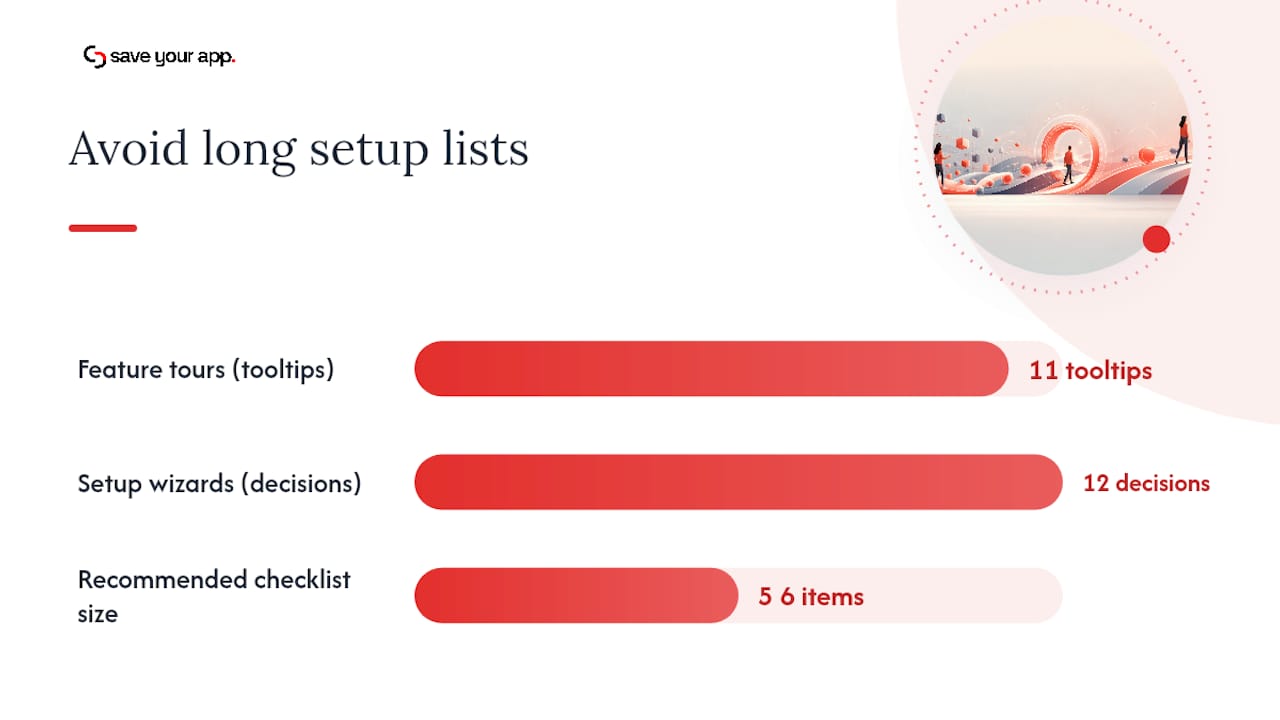
Feature-by-feature tours are the most common onboarding mistake still in production today. Walking a new user through eleven tooltips that each describe a button does nothing for activation. What works is a tour built around one complete workflow, from trigger to outcome, so the user sees the product do something useful in under two minutes.
An in-app checklist widget should tie to real product events, not manual check marks. If a user connects an integration, that item auto-completes. If they haven't invited a teammate, it stays open until they do. A checklist that requires users to manually tick boxes for things they've already done trains them to ignore it.
- Build tours around one end-to-end workflow, not a feature tour of the whole interface
- Auto-complete checklist items when the underlying event fires, never on a manual click alone
- Use a visible progress meter, five of seven steps done reads very differently from a blank list
- Cap the checklist at five to seven items so it doesn't read as a chore
- Sequence items so the highest-value action comes first, not last
Progress bars and completion meters aren't just a nice visual. The Zeigarnik effect, the psychological tendency for incomplete tasks to stay mentally "open" and pull attention back to them, is the actual mechanism behind why a 60%-complete checklist nags at people until they finish it. Teams that treat the progress bar as decoration are leaving a real behavioral lever on the table.
Pro Tip: Order your checklist so the fastest, highest-value action sits first. A user who completes one item in the first ninety seconds is far more likely to finish the rest than one who opens a checklist and sees a ten-minute setup task at the top.
Cognitive load kills momentum fast. If your setup wizard asks for twelve configuration decisions before a user has seen any value, you've built a wall, not a path.
Messaging, Nudges, and Support Timing That Rescue Stalled Users
Timing is the entire game here. A nudge sent too early feels like nagging. One sent too late arrives after the user has already decided your product isn't worth the effort.
- Send the welcome sequence within 24 hours of signup, with one clear next-step link, not five competing calls to action.
- Trigger an automated nudge when a checklist item sits incomplete for 48 hours, referencing the specific step, not a generic "come back" email.
- Escalate to human outreach after five days of inactivity on a paid account. A CSM email that references the exact stalled step outperforms a templated check-in every time.
- Offer recorded training and self-serve documentation alongside live kickoff calls, some users will never book a call but will watch an eight-minute video.
- Run scheduled office hours for admins on higher-value plans, especially during the first thirty days when configuration questions cluster.
The 48-hour and 5-day thresholds aren't arbitrary. They map to how quickly interest decays: a user who stalls for two days probably hit friction, not disinterest. A user who's been quiet for five days on a paid plan needs a person to reach out, not another automated email.
Sample escalation message for a stalled account: reference the specific unfinished step, offer a fifteen-minute call, and include a direct scheduling link. Skip the "just checking in" language entirely. It signals the message is templated, and stalled users can tell.
Metrics and Dashboards That Prove the Checklist Works
Time-to-Value (TTV) measures the days between signup and the moment a user hits their first meaningful outcome, not their first login. Activation Rate measures the percentage of new accounts that complete your defined activation event within a set window, usually the first 7 or 30 days.
Two more metrics round out the picture. First-value confirmation rate tracks how many users reach the specific milestone you've defined as "value delivered," whether that's a completed workflow or a connected integration. Feature adoption depth tracks how many core features a user has touched, not just logged into, by day 30 and day 90.
- Define TTV as calendar days from signup to first confirmed value event, not first login
- Set activation rate windows at day 7 for self-serve products and day 30 for sales-assisted deals
- Track feature adoption depth as a count of distinct core actions completed, not total clicks
- Build a health score combining login frequency, checklist completion, and feature depth
- Flag accounts with zero login activity for five or more days as an automated at-risk trigger
Onboarding checklists that engage users show activation rates two to three times higher than accounts that never touch the checklist at all. That gap alone justifies the engineering time to build one properly.
Cohort windows matter for honest measurement. Looking at day 1 tells you almost nothing. Day 7 shows early friction. Day 30 shows whether value stuck. Day 90 tells you whether the account is actually going to renew. Share a simple dashboard with product and CS leadership weekly during a launch and monthly once the checklist stabilizes, tracking TTV, activation rate, and the percentage of accounts flagged at-risk.
Any checklist item with a completion rate under 70% deserves a hard look. Items that consistently underperform usually signal either unclear instructions or a step that doesn't actually deliver value, not a lazy user base.
What Counts as Activation Across Different SaaS Products
Activation means something different depending on what you sell, and treating every product's "aha moment" the same way is how teams end up chasing the wrong metric.
For a B2B admin tool, activation often means a completed core workflow: a payroll run processed, an invoice sent, a report generated end to end. For a developer tool, activation usually means an API call that succeeded in production, not a sandbox test. For a collaboration product, activation typically means recurring usage from more than one person on the account within the first two weeks, since a single user logging in daily doesn't prove the tool spread through the team.
- B2B admin software: one full workflow completed with real data, not a demo dataset
- Developer platforms: a live API call or integration confirmed in a production environment
- Collaboration tools: at least two distinct users active in the same account within 14 days
- Data or analytics products: a saved report or dashboard referenced again in a later session
- Verify activation through analytics events first, customer attestation second
Recorded training sessions and kickoff calls are not activation. A customer who sat through a demo and never touched the product again hasn't activated, no matter how good the call felt. Verification should lean on analytics evidence wherever the event is trackable, and fall back to a direct customer confirmation only when the value delivered is qualitative and hard to instrument, like a workflow improvement a customer describes in a check-in call.
Declaring onboarding "done" the moment training wraps is one of the more expensive habits in customer success. It hides churn risk until the renewal conversation, by which point there's no runway left to fix it.
Handing Off to Retention: ROI Evidence and QBR Readiness
Onboarding doesn't end when the checklist hits 100%. It ends when the account is stable enough to hand to ongoing customer success without losing context, and that handoff is where a lot of good onboarding work gets wasted.
The handoff document to CS should name the account owner, the agreed check-in cadence, the renewal date, and any open risks the onboarding team flagged but didn't resolve. An account that struggled with a slow integration shouldn't quietly become "healthy" in the CRM the day ownership transfers.
- Name the receiving CSM and the first scheduled check-in date, not just "assigned"
- Log the renewal date and contract terms directly on the handoff record
- List every open risk or unresolved request, even minor ones, so nothing gets dropped
- Capture at least one quantifiable ROI data point during onboarding itself
- Flag expansion signals: seat growth requests, new team adoption, integration expansion asks
ROI evidence is far easier to capture during onboarding, while the customer is actively comparing before-and-after, than to reconstruct six months later for a quarterly business review. If a customer mentions saving four hours a week on a task, write that down immediately. It becomes the backbone of the QBR agenda.
Schedule the first QBR before the 90-day mark, even for mid-market accounts. Build the agenda around the ROI data captured at onboarding, the activation and adoption metrics tracked since, and one clear expansion or renewal ask. An account that reaches its first QBR with documented wins converts to expansion conversations far more smoothly than one where the CSM is reconstructing value from scratch.
A Copy-Ready, Stage-by-Stage Onboarding Checklist Template
Here's a compact version you can drop into a project tracker or Notion doc today. Each item names an owner and a completion signal, so nobody has to guess whether it's actually done.
- Sales handoff complete — Owner: Sales/CS. Signal: handoff doc filled, exec sponsor named.
- Account provisioned and billing verified — Owner: Ops/CS. Signal: login credentials work, invoice sent.
- Welcome email sent — Owner: CS. Signal: email delivered within 24 hours of signup.
- First login completed — Owner: Automated. Signal: login event fires in analytics.
- Core workflow tour completed — Owner: Automated/CS. Signal: tour completion event logged.
- Admin/power-user invites sent — Owner: Customer. Signal: at least one teammate invited.
- First value milestone reached — Owner: Automated. Signal: activation event fires (defined per product).
- Kickoff or training session held — Owner: CS. Signal: call completed, recording sent.
- CS handoff to ongoing success — Owner: Onboarding lead. Signal: handoff doc signed off.
Convert items 4, 5, and 7 into automatic checks tied to product events wherever your analytics stack allows it. Manual verification should be reserved for anything a machine can't see, like whether a customer actually understood the training, not whether they clicked a button.
Customize the checklist by trimming it to five or six items for simple self-serve products, and expanding it with SSO and data migration steps for enterprise accounts, which commonly take 60 to 90 days to fully onboard.
Choosing In-App Widgets, Email Flows, or Documentation
None of these three implementation options works well alone, and picking just one is usually a resourcing decision, not a strategy decision.
- In-app checklist widgets convert best because they meet users where they already are, but they take engineering time to build and maintain
- Email-driven sequences scale cheaply and reach users who aren't logging in, but open rates decay fast after the first week
- Static documentation serves as a fallback and search-driven reference, but almost nobody reads it proactively before they hit a problem
The strongest pattern combines all three: an in-app widget as the primary driver, an email sequence that nudges people back when the widget goes untouched, and documentation linked directly from both. For a 30-day pilot, aim to have the in-app widget live by day 10, the email triggers instrumented by day 15, and a full review of completion rates by day 30 before rolling out account-wide.
Auto-complete instrumentation is the piece teams skip under deadline pressure, and it's the piece that makes the whole system trustworthy. AI-assisted workflow automation can handle a good share of the provisioning and event-tracking setup, freeing the CS team to focus on the accounts that actually need a human.
A One-Page Checklist Plus Three Quick Experiments to Run
Print or paste this version somewhere your whole team can see it during a launch.
- Pre-onboarding: handoff doc, provisioning, welcome email (Owner: Sales/CS)
- Signup: minimal fields, OAuth, role capture (Owner: Product)
- First session: empty state CTA, admin invites, event tracking (Owner: Product/CS)
- First value: activation event defined and instrumented (Owner: Product)
- Ongoing: nudges at 48 hours and 5 days, QBR scheduled by day 90 (Owner: CS)
Three experiments worth running before a full rollout:
- Test welcome email timing. Compare sending within one hour versus within 24 hours. Success criteria: measurable lift in first-login rate within 48 hours.
- Test checklist length. Compare a five-item checklist against a nine-item one on the same cohort. Success criteria: higher completion rate without a drop in activation.
- Test escalation timing. Compare human outreach at day 3 versus day 5 for stalled accounts. Success criteria: which threshold recovers more accounts to active status.
A 10-account pilot is enough to validate any of these before you commit engineering time to a full build. Track TTV and activation lift in that small group, then decide whether to roll out further.
Making Onboarding Feel Personal Without Building Ten Products
A checklist that looks identical for a solo freelancer and a 500-seat enterprise account is going to feel wrong to both of them. Personalization doesn't mean building separate products. It means branching the same checklist based on what you already know about the account.
Use signup data, company size, stated use case, industry, to route users into slightly different first-session experiences. A marketing team signing up for an analytics tool needs a dashboard template pre-loaded with campaign metrics. An engineering team signing up for the same tool needs API documentation surfaced first. Same product, different entry point.
Behavioral triggers matter as much as declared attributes. If a user skips the integration step three times, that's a signal to surface a simpler, lower-commitment version of that step rather than repeating the same prompt. If a user finishes the checklist in under ten minutes, that's a signal they're technically confident and can skip hand-holding in future sessions.
Personalization at the messaging layer is often cheaper to build than personalization inside the product itself. A welcome email that references the specific integration a customer mentioned during the sales call reads as attentive. The same email sent to everyone reads as automated, even when it technically isn't.
The mistake to avoid is over-branching too early. Three or four onboarding tracks, segmented by role or use case, capture most of the value. Building fifteen micro-paths for every possible customer combination creates a maintenance burden that outpaces the marginal gain in relevance.
How to Segment Onboarding by Role and Customer Type
The same product usually serves at least two very different kinds of users, and giving them identical onboarding checklists is a common way to under-serve both.
Segmenting activation criteria by audience, admins versus end users versus developers, lets one product support very different onboarding tracks without maintaining separate codebases. An admin needs to see user management and billing settings early. An end user needs to see the core workflow they'll touch daily. A developer needs API keys and documentation within the first five minutes, not buried three menus deep.
- Admins: prioritize user provisioning, permissions, and billing visibility in the first session
- End users: prioritize the core daily workflow and skip administrative settings entirely
- Developers: surface API keys, documentation links, and sandbox environments immediately
- Enterprise buyers: include SSO and security documentation in the pre-onboarding stage, not as an afterthought
- Self-serve individual users: compress the entire checklist to three or four items maximum
Customer type matters as much as role. A self-serve trial user exploring on their own credit card behaves nothing like a sales-assisted enterprise buyer with a signed contract and an executive sponsor watching the timeline. The self-serve user needs speed and minimal friction. The enterprise buyer needs structure, a named point of contact, and visible proof that the vendor takes security and support seriously.
Segmentation also changes who owns each checklist item. For self-serve accounts, automation should own almost everything. For enterprise accounts, a human CSM should own the pre-onboarding and kickoff stages explicitly, because the cost of a dropped ball is much higher when the contract value is higher.
Common Onboarding Mistakes That Quietly Kill Activation
The same handful of mistakes show up across nearly every SaaS onboarding audit, and they're rarely the ones teams expect.
Treating the checklist as a one-time build is the biggest one. Teams ship an onboarding flow, celebrate the launch, and never revisit it as the product changes. Six months later, half the checklist items point to features that have been redesigned or removed, and completion rates quietly drop without anyone noticing why.
Front-loading too much configuration before the user sees value is another. Asking someone to connect four integrations, invite a team, and configure notification preferences before they've seen the product do anything useful guarantees a chunk of them never make it past step two.
Declaring victory at feature adoption instead of business outcome adoption is subtler but just as damaging. A user who's clicked every button in the interface hasn't necessarily gotten value. A user who's completed one workflow that solved a real problem has, even if they've never touched half the feature set.
- Ignoring stalled accounts until the renewal call, rather than at day 5 or day 10
- Sending identical messaging to admins and end users who need entirely different next steps
- Measuring only login frequency instead of tracking whether real work is getting done
- Letting sales promise capabilities that don't match the plan the customer actually bought
- Never revisiting checklist item completion rates after the initial launch
The fix for most of these isn't a bigger checklist. It's a smaller one, checked regularly against real completion data, with clear ownership for whoever's supposed to notice when something breaks.
Collecting Feedback Without Interrupting the Flow
Feedback during onboarding needs to be lightweight enough that it doesn't become another obstacle between the user and their first real result.
A short in-app survey after the first value milestone works better than a long form at signup, because the user actually has something to say at that point. Two or three questions, delivered as a small in-app prompt rather than an email, get meaningfully higher response rates than anything sent to an inbox during the first week.
Net Promoter Score has a place here, but timing determines whether it's useful or noise. Asking for an NPS score on day one, before a user has done anything meaningful, produces a number that means almost nothing. Asking at day 30, once someone has reached first value or hit a wall trying to, produces a score that actually correlates with retention.
- Trigger a short survey immediately after the first-value event, not at signup
- Ask one open-ended question alongside any NPS score to capture the "why"
- Route low scores directly to a CSM for follow-up within 24 hours, not a weekly batch review
- Use exit-intent or abandonment surveys for users who stall and never return
- Review qualitative feedback threads monthly to catch recurring language patterns
Abandonment feedback deserves particular attention. A short, one-question survey sent to an account that's gone quiet for ten days, "What stopped you from finishing setup?", often surfaces the exact friction point that a dashboard full of aggregate metrics can't show. The answers tend to cluster fast, and that clustering is usually your next checklist fix.
Automation Tools That Take the Manual Work Out of Onboarding
Manual onboarding doesn't scale past a handful of accounts a month, and trying to force it to scale is how CS teams burn out chasing spreadsheet updates instead of talking to customers.
Provisioning automation should handle account creation, seat assignment, and initial configuration the moment a deal closes in the CRM, without anyone needing to manually create a workspace. Event-based automation should auto-complete checklist items the instant the underlying action happens, a connected integration, an invited teammate, rather than relying on a human to check a box.
- Auto-provision accounts and seats directly from CRM deal-closed events
- Trigger checklist auto-completion from product event data, not manual updates
- Automate the 48-hour and 5-day nudge sequences based on checklist inactivity
- Route at-risk accounts (defined by login gaps or stalled checklist items) directly into a CSM queue
- Auto-generate onboarding health scores from combined login, adoption, and checklist data
AI-assisted workflow tools are increasingly handling the layer above simple event triggers, drafting personalized nudge copy based on where a specific account stalled, or summarizing a customer's usage pattern into a one-line health note for a CSM. That doesn't replace human judgment on complex accounts, but it removes the repetitive work that used to eat a CSM's morning.
The goal of automation here isn't to remove humans from onboarding. It's to make sure the humans on your team spend their time on the accounts and moments where a person actually changes the outcome, not on manually checking whether someone logged in yesterday.
Keeping Customers After Onboarding Officially Ends
The riskiest period for churn isn't month one. It's the gap right after onboarding wraps, when the structured check-ins stop and the account is on its own for the first time.
A structured follow-up cadence should exist independent of any support ticket or renewal date. Thirty, sixty, and ninety days after activation are natural checkpoints to review usage data and confirm the account is still getting the value that was promised during onboarding, not just logging in out of habit.
- Schedule a 30-day check-in focused on adoption depth, not just login frequency
- Schedule a 60-day check-in to surface expansion opportunities or unresolved friction
- Schedule the 90-day QBR around documented ROI, tying back to onboarding-stage evidence
- Monitor feature adoption depth quarterly and flag accounts that plateau early
- Re-engage dormant power users with a targeted nudge referencing their specific prior usage
Watching for adoption plateaus matters more than watching for outright disengagement. An account that used five features in month one and still uses only those same five in month six isn't churning yet, but it's also not growing into the product, and that's usually a leading indicator of a quiet non-renewal six months out.
The strongest retention motion treats the onboarding data as a permanent record, not a one-time project file. The ROI evidence captured in week two, the features adopted by day 30, the checklist items that stalled and got rescued, all of that belongs in the account record a CSM references at every future touchpoint, not just the ones during onboarding itself.
Where Most Onboarding Checklists Quietly Fail
Three mistakes show up in almost every onboarding audit I've looked at, and none of them are exotic. The first is a sloppy sales handoff: promises made in the sales cycle that never make it into a document CS can act on. The second is a vague activation definition, "the user logged in a few times" isn't activation, it's a login count. The third is a checklist nobody measures, built once, shipped, and never revisited against real completion data.
The fix isn't complicated, but it takes discipline most teams skip under launch pressure. Assign a single onboarding owner before the account is even provisioned. Instrument one clear activation event tied to real product usage, not a proxy metric. Then run a small audit, ten accounts is plenty, to see where the checklist actually breaks versus where you assume it does.
That last step is where most teams guess instead of measure. A structured audit using a specialized analysis engine can rank onboarding friction points by actual impact on signup and activation rather than by whichever complaint reached a product manager's inbox most recently. The gap between what a team thinks is broken and what's actually costing activations is usually bigger than anyone expects.
— William
How Saveyourapp Finds the Onboarding Friction You're Missing
Most teams building a checklist like the one above are working from instinct: which step feels clunky, which page a colleague complained about. This guesswork can be replaced with a structured audit. The Prism Engine™ scans your signup and onboarding flow across seven layers, including a dedicated onboarding layer, then pairs those AI-driven diagnostics with human beta tester reviews to catch what automated scans miss, the confusing empty state, the CTA that reads clearly to your team but confuses a first-time user.
The output is a ranked list of fixes by impact, rather than generic recommendations, delivered as a PDF report with prioritized remediation guidance for designers or engineers. If your onboarding checklist keeps stalling at the same step and you can't tell whether it's the copy, the flow, or something in signup, that's exactly the gap a structured audit closes.
Run a free scan to see where your onboarding flow is losing signups, or check the Solo and Founder plans if you want ongoing human-reviewed audits as your product evolves. For a deeper look before a major onboarding redesign, the Extra 3-day test adds a focused round of human testing on top of the standard audit.
Templates, Research, and Tools Worth Bookmarking
- Customer onboarding checklist template, timeline benchmarks for standard versus enterprise accounts
- 26-point SaaS onboarding checklist, a downloadable, action-based template
- Zeigarnik effect research, the psychology behind progress bars and checklist completion
- Customer success video resources from Kept, useful training material for CS teams
- Saveyourapp, run a free audit scan of your own onboarding flow
Sources
- 26-Point SaaS Onboarding Checklist + Template
- SaaS Onboarding Checklist 2026: Signup to Value
- SaaS onboarding checklist template (2026): from signup to activation | Skene
FAQ
What Should Be in a Basic SaaS Onboarding Checklist?
A basic checklist covers pre-onboarding handoff, signup and first login, first value delivery, activation, and a handoff to ongoing customer success. Each item needs a named owner and a measurable completion signal, not just a task description.
How Long Should SaaS Onboarding Take?
Most self-serve and mid-market B2B accounts should complete onboarding within 14 to 30 days, while enterprise accounts with SSO or data migration often take 60 to 90 days. Timelines longer than that usually signal a stalled handoff or an unclear activation definition.
What Metrics Matter Most for Onboarding Success?
Time-to-Value and Activation Rate are the two core metrics, supported by first-value confirmation rate and feature adoption depth. Track completion by cohort windows at day 7, 30, and 90 to see whether early wins translate into lasting usage.
Can a Checklist Really Improve Activation Rates?
Yes. Accounts that actively engage with an onboarding checklist activate at two to three times the rate of accounts that never interact with one, largely because visible progress keeps users moving toward completion.
Does Saveyourapp Offer an Onboarding Checklist Template?
Saveyourapp focuses on auditing your existing onboarding and signup flow rather than providing checklist templates. Its Prism Engine™ combines AI diagnostics with human beta tester reviews to identify exactly where your current checklist or signup flow is losing users, with pricing for deeper audits listed on the pricing page.
How Do I Know if My Onboarding Checklist Is Actually Working?
Watch completion rate per checklist item and flag anything under 70% for review, since low completion usually signals friction or unclear value rather than user disinterest. Pair that with activation rate trends over rolling 30-day cohorts to confirm the checklist is driving real outcomes, not just clicks.