
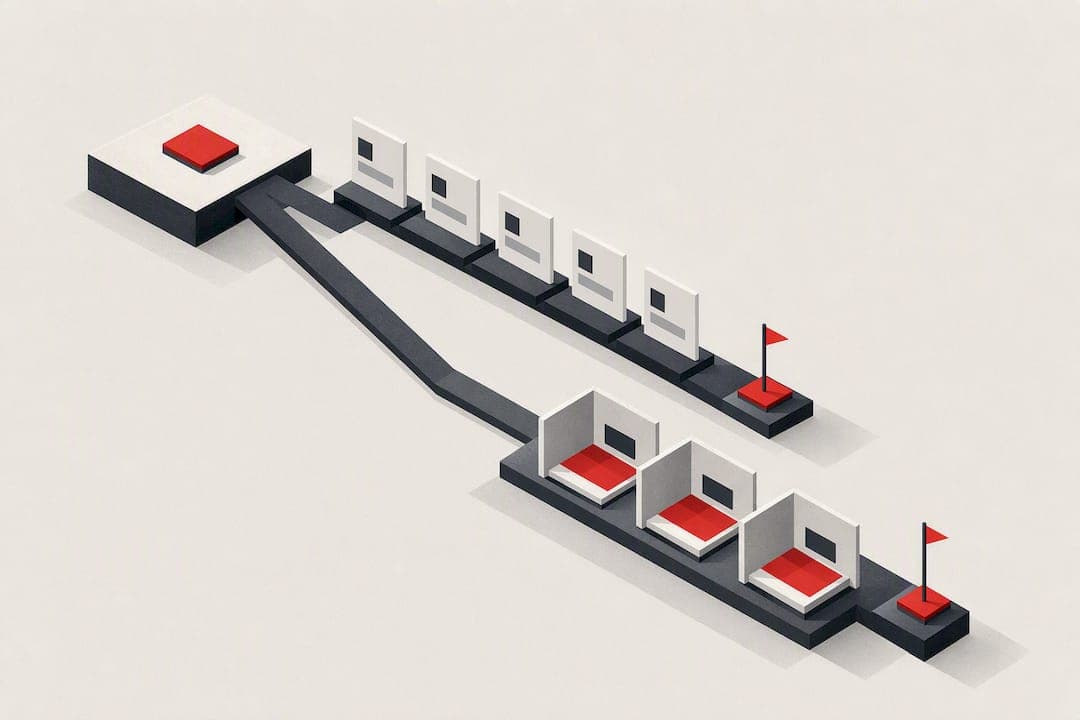
Remote usability testing means watching people use your product from wherever they already are, either live over video (moderated) or on their own schedule through a recorded platform (unmoderated). The rule of thumb: choose moderated when you need to understand why users struggle or you're testing something complex, and choose unmoderated when you need speed, scale, or answers to a simple, well-defined task.
TL;DR:
- Unmoderated tests support larger sample sizes and faster turnaround times but cannot clarify user confusion or interpret misunderstandings during the session.
- Moderated tests provide detailed insights into user frustrations and hesitations but are limited by high costs, smaller samples, and longer scheduling needs.
- Successful research depends on defining a single, clear goal, measurable success criteria, and testing scopes that are specific and manageable to produce actionable data.
- Proper screener questions should focus on actual behaviors and use cases rather than demographics to recruit participants who reflect real user scenarios.
- Prioritizing fixes benefits from structured ranking tools that combine test findings with AI diagnostics, enabling teams to act on the most impactful issues quickly.
Table of Contents
- What's the Difference Between Moderated and Unmoderated Usability Testing?
- How Do You Plan a Remote Usability Test?
- How Do You Recruit the Right Remote Usability Testing Participants?
- How Do You Write Tasks and Scripts for Remote Testing?
- What's the Best Way to Run Moderated Remote Sessions?
- How Do You Set Up a Reliable Unmoderated Usability Test?
- How Do You Analyze Remote Usability Test Results?
- What Are the Biggest Risks to Remote Testing Validity?
- How Does Saveyourapp Turn Test Findings Into Fixes?
- Author Perspective: Priorities When Time or Budget Is Tight
- Ready to Turn Your Findings Into a Prioritized Fix List?
- Sources
- FAQ
What's the Difference Between Moderated and Unmoderated Usability Testing?
The two formats solve different problems, and picking the wrong one wastes both time and participant goodwill. Nielsen Norman Group frames the choice around four variables: your research goal, how much you need to know "why" something happened, your budget, and your timeline.
Moderated sessions put a real researcher on the call with the participant. You can ask a follow-up when someone hesitates, redirect a confused participant back on track, and catch nonverbal cues like a frustrated sigh or a squinted eye at a confusing label. That depth costs you time. You'll typically talk to somewhere between five and twelve people, and each session eats up an hour of scheduling, running, and note taking.
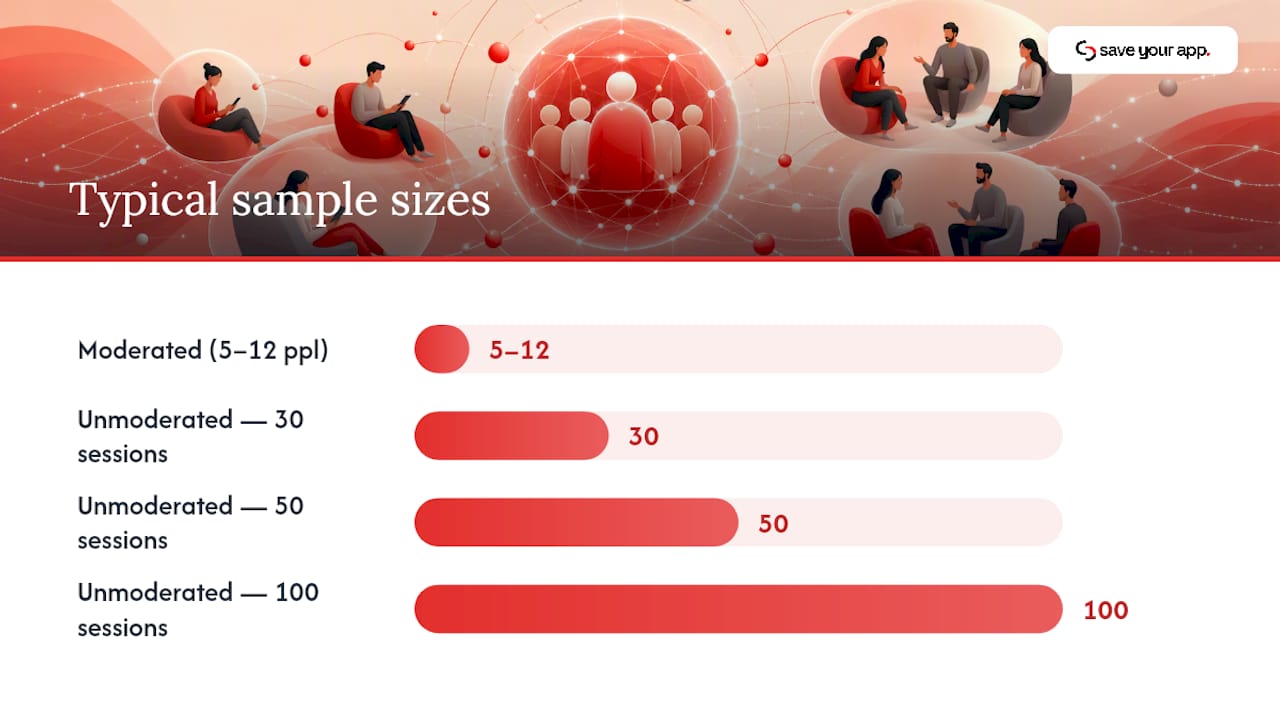
Unmoderated testing flips the equation. Participants complete tasks alone, on their own time, often through a platform that records their screen and voice. You lose the ability to probe in the moment, but you gain volume. Running 30, 50, or 100 sessions unmoderated costs roughly the same coordination effort as running five moderated ones.
Here's how the trade-offs break down in practice:
- Moderated gives you the "why," works well for complex or multi-step flows, and lets you adapt questions in real time, but it's slow and expensive per participant.
- Unmoderated gives you the "what," scales cheaply across dozens of users, and works around time zones, but it can't clarify a confusing task or catch a participant who misunderstood instructions.
- Turnaround for unmoderated studies often lands in a day or two; moderated studies usually need a week or more once you count scheduling and analysis.
- Sample size for moderated work tends to stay small and focused; unmoderated studies are built for larger, more statistically comfortable samples.
Most experienced teams don't pick one and stick with it forever. A common pattern is triage first: run an unmoderated study to spot where users are dropping off or getting confused, then follow up with a handful of moderated sessions targeting exactly those pain points. You get the scale of unmoderated data and the depth of moderated conversation, without paying for either at full price twice.
How Do You Plan a Remote Usability Test?
A test plan without a measurable goal is just an expensive way to watch people click around. Before you recruit a single participant, nail down what you're actually trying to learn.
Start with one primary research question. Not three, not five. "Can new users complete signup without help" is a research question. "Understand the onboarding experience" is not. Once you have the question, attach one to three success criteria you can actually measure. Task success rate, time on task, and a standardized satisfaction score like the System Usability Scale cover most needs and let you compare results across rounds of testing.
Here's a simple sequence for building the plan:
- Write the research question in plain language, phrased as something you could answer with a yes, no, or a number.
- Define 1 to 3 success metrics tied to that question, such as completion rate or SUS score.
- Decide what you're testing, whether that's a live product, a clickable prototype, a specific device type, or a single flow, like checkout.
- Assign roles and time budgets, including who moderates, who observes and takes notes, and who owns analysis afterward.
- Set a timeline that accounts for recruiting, running sessions, and synthesis, not just the sessions themselves.
Scope matters as much as the question. Testing an entire app in one session produces shallow, scattered data. Testing one flow, say, updating a payment method, produces sharp, actionable data. If you're choosing between a prototype and the live product, remember that prototypes let you test ideas before engineering time is spent, but live products reveal real performance issues, load times, and edge cases a prototype can't fake.
Pro Tip: Write your success criteria before you write a single task. If you can't state what "success" looks like in a sentence, the task isn't ready to test.
How Do You Recruit the Right Remote Usability Testing Participants?
A well-run session with the wrong participant produces confident, useless data. Screener quality matters more than almost anything else in this process, and the most common mistake is screening for demographics instead of behavior.
Instead of asking whether someone is between 25 and 40 years old, ask whether they've purchased a subscription service online in the last three months, or whether they manage a team's budget at work. Behavioral and use-case questions filter for people who will actually recognize your product's context, while demographic-only screens let in people who technically qualify but have no relevant frame of reference.
A few recruiting fundamentals worth locking in:
- Aim for a mix of core users (people who match your primary persona) and at least one or two edge-case users who stress-test assumptions, like someone using an older device or a screen reader.
- Set a target minimum per segment. Five to eight participants per user type is a reasonable floor for moderated work; unmoderated studies can comfortably support larger segment sizes.
- Recruit through a mix of channels: your existing customer base, a research panel, or a testing platform's participant pool, depending on how niche your target user is.
- Build scheduling cadence around buffer time. Back-to-back sessions with no breathing room are how moderators burn out and miss details.
- Keep incentives proportional to time and effort. A 45-minute moderated session usually warrants a meaningfully higher incentive than a 10-minute unmoderated task.
Recruiting against known gaps, not just convenience, is what separates a study that confirms what you already believed from one that actually surfaces something new.
How Do You Write Tasks and Scripts for Remote Testing?
The single biggest scripting mistake is telling participants how to do something instead of what to achieve. "Click the settings icon, then select billing" teaches nothing about whether your navigation is intuitive. "Update your billing address" tells you exactly that.
Goal-oriented tasks describe an outcome and let the participant find their own path. If they struggle, that struggle is your data. If they succeed in three seconds, that's data too.
A standard remote test script follows a predictable shape:
- Introduction and consent, explaining what you're testing (and reassuring participants you're testing the product, not them).
- Warm-up questions, a couple of easy, low-stakes prompts to get people talking naturally.
- Core tasks, three to six goal-oriented prompts tied directly to your success criteria.
- Probes between tasks, open questions like "What are you thinking right now?" or "What did you expect to happen there?"
- Closing questions, including an overall satisfaction rating and a chance for the participant to add anything unprompted.
Neutral probing is a skill, not a script line. "What did you expect to happen when you clicked that?" is neutral. "Wasn't that confusing?" is leading, and it plants an opinion the participant didn't have. Practitioner guidance consistently points to keeping follow-ups open ended rather than suggestive, precisely because a leading question contaminates the very data you're trying to collect.
One underrated decision: real data versus dummy data. Letting participants interact with their own account and real information produces more natural behavior, since people navigate their own data differently than a stranger's mock account. When privacy or logistics make that impossible, invest real effort into believable dummy data. A fake account with three items in a cart and a name like "Test User 1" signals unreality immediately, and participants behave differently once they know nothing is at stake.
Pro Tip: Read your script out loud before the first session. Scripts that look neutral on paper often reveal a leading tone the moment you hear yourself say them.
What's the Best Way to Run Moderated Remote Sessions?
Session length is the first thing to get right, and it's also the thing most new researchers get wrong by trying to cram too much into one call. Gov, capping the day at six sessions maximum, and building in at least 15 minutes of buffer between each one.
That buffer isn't optional padding. It's where you jot down first impressions, reset your recording software, and mentally reset before the next participant. Skip it, and by session four your notes start blurring together.
Before any session starts, run through a short technical checklist:
- Confirm the recording tool captures both screen and audio, and test it with a dry run, not just a settings check.
- Have a backup recording method ready, whether that's a second app or your video platform's native recorder.
- Verify the participant's device and browser combination matches what you intend to test, especially for mobile studies.
- Send a plain-language tech setup email beforehand so participants aren't troubleshooting Zoom permissions during the first five minutes of a paid slot.
- Confirm screen-share permissions work on the participant's operating system before the session, particularly on macOS, which often blocks screen recording by default.
During the session itself, moderator technique makes or breaks data quality. Silence is a tool: when a participant pauses, resist the urge to fill the gap with a hint. Let them think out loud. Ask open questions ("What are you noticing here?") instead of closed ones ("Is that clear?"), and watch your own language for leading phrases that telegraph the "right" answer.
If you're running with an observer, agree on note-taking conventions before session one. A simple shared doc with timestamps, a quote column, and a severity tag (minor, moderate, blocker) turns six hours of raw footage into something your team can actually synthesize the same day.
How Do You Set Up a Reliable Unmoderated Usability Test?
Unmoderated tests live or die on task clarity, because there's no researcher in the room to clarify a confusing instruction. Every task needs an objective, checkable success condition: did the participant reach the confirmation screen, did they select the correct plan, did they find the right setting. Vague tasks produce vague, unusable recordings.
Because you can't intervene mid-session, quality control has to be built in ahead of time:
- Add one or two attention checks, like a task that requires reading a specific instruction carefully, to filter out participants clicking through on autopilot.
- Include a short post-task questionnaire asking participants to rate difficulty or explain their reasoning in a sentence or two.
- Target the right device and environment explicitly. If you're testing a mobile checkout flow, don't let the platform default to desktop participants.
- Set a minimum session duration threshold. A session logged at nine seconds for a five-step task is noise, not data.
The real analytical work in unmoderated testing is reconstructing context from indirect signals, since you weren't there to ask "why" in the moment. Combine the session recording with clickstream data (where did they hover, where did they backtrack) and the survey answers they gave afterward. A participant who took twice as long as everyone else but rated the task "very easy" is telling you something interesting, even without a direct quote explaining it.
How Do You Analyze Remote Usability Test Results?
Raw session footage is not a deliverable. Your job is turning hours of recordings into a short list of fixes your team will actually act on.
- Calculate core metrics first: task success rate, time on task per participant, error frequency by type, and a satisfaction measure like SUS if you collected one.
- Cluster observations by issue, not by participant. Every time three different people stumble on the same button, that's one issue with three data points, not three separate problems.
- Tag each cluster by frequency and severity, then link each tag back to the specific recording timestamp so stakeholders can watch the moment themselves instead of taking your word for it.
- Score priority as frequency times impact divided by fix effort, giving you a rough ranking of what to fix first rather than a flat list of "things we noticed."
- Package deliverables that travel well: short highlight clips, an annotated flow diagram showing where drop-off happened, and backlog tickets written in terms your engineering team can act on immediately.
The framing that gets fixes shipped is rarely "users were confused." It's "four of seven participants abandoned checkout at the shipping step because the promo code field looked mandatory." Specificity is what turns a research readout into a sprint ticket.
What Are the Biggest Risks to Remote Testing Validity?
Moderator bias creeps in through word choice more than intent. A moderator who says "Don't you think that's easier?" has just told the participant what to think. Keep every probe open ended, and rehearse the script out loud before the first real session to catch leading language you didn't notice on paper.
Sampling bias shows up when convenience recruiting replaces deliberate recruiting. If every participant comes from your existing power-user base, you'll never see the confusion a first-time user hits on day one. Recruit specifically against the gaps in your current user data.
Fatigue is a quieter risk. Sessions that run long, or days packed with back-to-back calls, degrade both participant honesty and moderator attentiveness. And unmoderated studies carry their own quality risk: bots, speed-clickers, and disengaged participants who just want the incentive. Attention checks and minimum duration filters catch most of them.
- Keep probes open and rehearsed, never leading.
- Recruit against known use-case gaps, not just who's available.
- Cap session length and build in real buffer time.
- Filter unmoderated data with attention checks before you trust the numbers.
Pro Tip: If two participants in a row give you nearly identical, oddly polished feedback, check their session timestamps. It's a common signature of low-effort or automated unmoderated responses.
How Does Saveyourapp Turn Test Findings Into Fixes?
A remote study tells you where users struggle. It doesn't automatically tell you what to fix first, or how each issue stacks against the dozen others competing for your team's next sprint. That's the gap Saveyourapp's Prism Engine™ is built to close, pairing AI-driven diagnostics with human beta tester reviews across seven audit layers, including UX and navigation, conversion, and onboarding.
Run your remote usability sessions to surface the specific friction points, whether that's a confusing pricing page or a stalled onboarding flow, and use an audit to cross-check those findings against a structured, ranked list of fixes. Instead of a list of observations, you get a prioritized dashboard and a PDF-ready report your team can hand straight to engineering. For teams juggling limited research bandwidth, that ranking does the prioritization work a manual synthesis session would otherwise eat hours on.
Author Perspective: Priorities When Time or Budget Is Tight
Most teams don't get to choose between "fast and shallow" or "slow and deep." They get squeezed budgets and squeezed timelines, and the honest answer is you triage.
When speed is the constraint, run an unmoderated study first to find where the bleeding is, then spend your limited moderated hours on the two or three worst spots, not a broad sweep. When depth is the constraint, the return on investment sits almost entirely in moderator training. A well-rehearsed, neutral moderator running six sessions on a realistic task will outproduce twelve sessions run by someone reading a script for the first time. Budget for practice runs, not just participant incentives. The gap between research that changes a roadmap and research that gets filed away usually traces back to how sharply the original question was framed, not how many people you talked to.
— William
Ready to Turn Your Findings Into a Prioritized Fix List?
You've run the sessions, tagged the friction points, and ranked what hurts most. The next question is always the same: what actually gets fixed first, and who decides? The platform is built for exactly that handoff, combining AI diagnostics with human reviewer input across multiple audit layers, then returning a ranked list of fixes instead of another wall of notes to sort through.
A free scan gives you a first read on where your page is losing signups, which pairs naturally with whatever your remote test already flagged. If you want ongoing tracking and deeper human review, the Solo and Founder plans unlock repeated audits and scoring trends, and a one-off 3-day extra test is available for $199 when you need a fast second look between full study rounds. Start with a scan at Saveyourapp and see how your ranked fixes compare to what your last usability session turned up.
Sources
FAQ
What Are the Five Types of Usability Testing?
Usability testing is commonly grouped into moderated, unmoderated, remote, in-person, and guerrilla (informal, low-cost) testing, though the categories overlap since remote and in-person tests can each be moderated or unmoderated. The clearest first split for planning purposes is moderated versus unmoderated, since that decision shapes everything else about how you run the study.
Can I Get Paid for Usability Testing?
Yes, participants in usability studies are typically compensated for their time, with incentive amounts scaled to session length and effort. Moderated sessions running 30 to 60 minutes usually carry a higher incentive than short, self-paced unmoderated tasks.
What Is the Difference Between UX Testing and UAT?
UX testing (including usability testing) evaluates whether real users can accomplish goals easily and pleasantly, while UAT (user acceptance testing) checks whether a system meets predefined business or contract requirements before launch. UX testing asks "does this work well for people," while UAT asks "does this match the specification we agreed on."
What Is Jakob Nielsen's Five-User Rule?
The widely cited guideline suggests that testing with five participants uncovers most of the major usability problems in a single round, since additional participants tend to repeat issues already observed. It applies mainly to qualitative, moderated testing aimed at finding problems, not to unmoderated studies where you're measuring metrics like completion rate across a larger sample.
How Long Should a Remote Usability Testing Session Last?
Moderated remote sessions should run between 30 and 60 minutes, with no more than six sessions scheduled per day and at least 15 minutes of buffer between each one. Unmoderated tasks are typically much shorter, often five to fifteen minutes per task, since there's no live conversation to account for.